Free AI YouTube Shorts
Title Generator
Generate scroll-stopping titles for your Shorts. Optimized for mobile, vertical videos - like TikTok and Reels.
See What LaunchLens Generates
5 AI-powered titles from your actual video transcript. Plus descriptions and tags, all in one optimization. 90 credits free, no card.
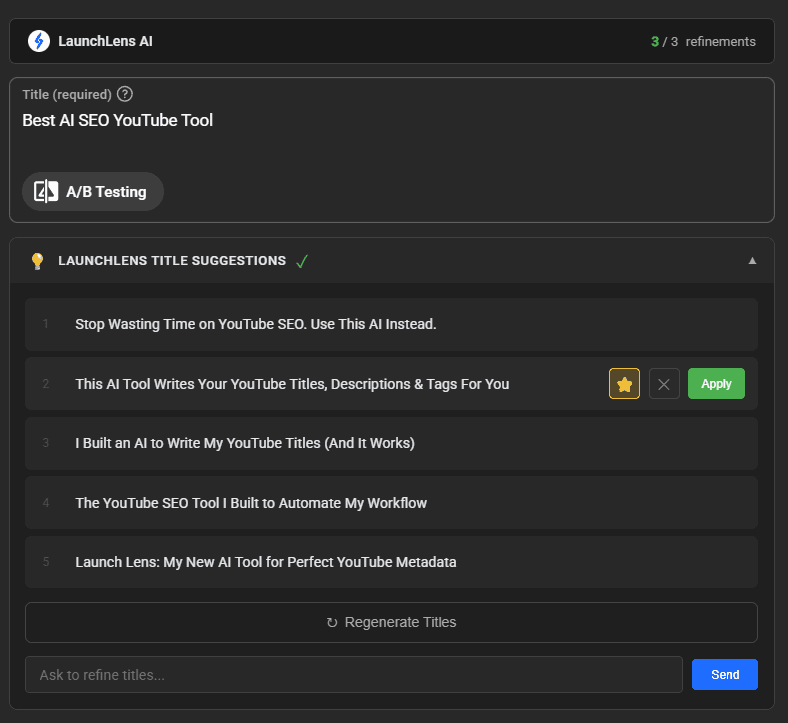
The thumbnail is what gets the click. LaunchLens makes that, and it writes your titles, descriptions and tags from the video while it is at it.
Try LaunchLens Free: 90 creditsNo credit card required • Connect your YouTube channel to start
Want the next one before it ships?
We will email you when a new free tool lands or we work something out worth stealing. No schedule, no selling your address on, unsubscribe from any email.
Looking for the Best YouTube Shorts Title Generator?
LaunchLens generates scroll-stopping titles specifically optimized for Shorts format - not just shortened regular titles. Get the viral formulas that work on TikTok, Reels, and YouTube Shorts.
Mobile-optimized length
POV, hooks, & pattern interrupts
No signup or credit card required
Shorts Titles vs Regular YouTube Titles
Short-form content needs a different approach. Here's what works for Shorts.
Regular YouTube Titles
For long-form content
- •60-70 characters optimal
- •Can include SEO keywords
- •Viewed on desktop & mobile
- •Benefit-driven, descriptive
YouTube Shorts Titles
For vertical, 60-second videos
- •Under 40 characters ideal
- •Hook-first, scroll-stopping
- •Mobile-only viewing
- •Emojis boost engagement
Viral Shorts Title Formulas
These patterns dominate TikTok, Reels, and YouTube Shorts. Our AI uses them to generate your titles.
POV: [situation]
POV: You just discovered a life hack
Day [X] of [challenge]
Day 30 of learning Korean
Wait for it...
Wait for it... (with satisfying ending)
[Number] things that...
3 things nobody tells you about...
This is why [fact]
This is why you're always tired
I tried [thing] and...
I tried this for 7 days and...
Shorts Title Best Practices
Follow these rules to maximize your Shorts performance.
Keep It Short
Under 40 characters ensures your full title displays on mobile without being cut off.
Front-Load the Hook
First 3 words must grab attention. Viewers scroll fast - you have milliseconds to stop them.
Create Curiosity
Leave something unanswered. 'Wait for it' and 'You won't believe' work because people need to know.
Use Strategic Emojis
1-2 relevant emojis boost CTR. They catch the eye while scrolling and add personality.
Match TikTok Energy
Shorts compete with TikTok and Reels. Use the same casual, punchy tone that works there.
Test Different Styles
POV titles, numbered lists, and reaction hooks perform differently by niche. Experiment!
Shorts Title Examples by Niche
See what viral Shorts titles look like in different content categories.
Gaming
- Wait for the clutch...
- Day 100 of Minecraft
- POV: You hit that shot
Cooking
- 30 second breakfast hack
- POV: Mom's secret recipe
- You've been doing it wrong
Fitness
- 3 exercises you're skipping
- Day 30 transformation
- This changed everything
Comedy
- When mom finds out...
- POV: Monday morning
- Nobody: Me at 3am:
Education
- School never taught this
- Why you feel tired
- 3 facts about space
Beauty
- Viral makeup hack
- POV: Getting ready
- This product changed my skin
More Free YouTube Tools
Complete your content optimization toolkit
Frequently Asked Questions
Everything you need to know about YouTube Shorts titles.
What makes a good YouTube Shorts title?
Great Shorts titles are short (under 40 characters), hook viewers immediately, create curiosity, and work on mobile screens. Popular formats include POV titles, numbered lists, and pattern interrupts like 'Wait for it...' or 'This is why...'
How long should a YouTube Shorts title be?
Ideally under 40 characters. Shorts are viewed primarily on mobile devices where longer titles get cut off. Short, punchy titles perform better for scroll-stopping power.
Should I use emojis in Shorts titles?
Yes, strategically! 1-2 relevant emojis can help your Shorts pop in the feed. They catch the eye while scrolling and add personality. Don't overdo it - too many emojis look spammy.
Are Shorts titles different from regular YouTube titles?
Yes! Shorts compete with TikTok and Reels, so titles need to be shorter, punchier, and more scroll-stopping. Regular YouTube titles can be 60-70 characters; Shorts titles work best under 40 characters with immediate hooks.
What title formats work best for YouTube Shorts?
Top-performing formats include: POV titles, 'Day X of...' series, 'Wait for it...', numbered tips ('3 ways to...'), reaction hooks ('I can't believe...'), and curiosity gaps ('This is why you're...').
Can I use this for TikTok and Instagram Reels too?
Absolutely! The title formulas that work for YouTube Shorts also work great for TikTok and Instagram Reels since they're all competing for the same scroll-stopping attention on mobile devices.